
Overview
Prezly enables PR teams to publish multimedia stories, manage media outreach, and track campaign analytics through a single integrated platform. The software is designed to help organizations build sustained media presence across Google, newsletters, and other channels beyond traditional journalist outreach.
Key people

In the news
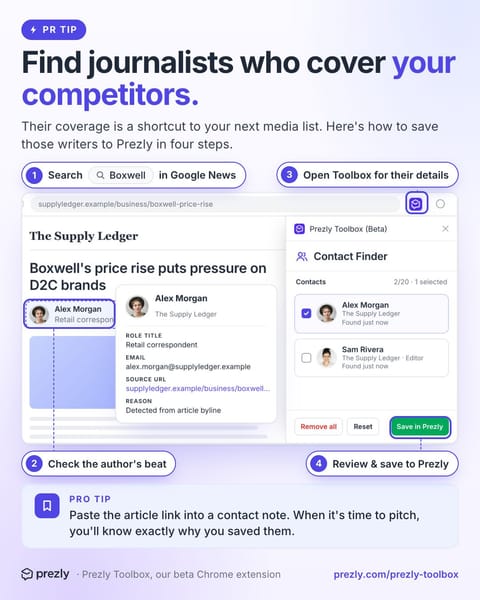
- Find journalists who cover your competitors. Add the relevant ones to your media list without copying their details by hand. Here's how: 1. Search a competitor's name in Google News. Open a recent article, skipping press-release reposts. 2. Check the author's recent work. Do they cover topics relevant to your news? 3. Open Prezly Toolbox on the article. On supported pages, it finds author names, publications and available email addresses. 4. Select the relevant author, review their details and save them to Prezly. Extra tip: add the
- Who in your contact list should you pitch next? With Prezly AI, you can ask your AI assistant to search your existing contacts and check your pitching history. Just ask “Which contacts tagged sustainability haven't we pitched in six months?” From there it'll pull together matching contacts, their publications and past outreach. That way, you can review a shortlist instead of checking each contact separately. You decide who's right for the story. Your assistant helps with the searching. Works with supported ChatGPT, Claude, and

- With Prezly's MCP, you can now pull your PR results straight into Claude, ChatGPT, or Gemini. Ask "How did Tuesday's campaign compare with last month?" and you'll get open rates, clicks, story views and coverage side by side, right in the conversation. You can then ask follow-up questions and build your report from there. A few other things you can do: - Find contacts you haven't pitched recently - Check what's still in draft and what needs attention - Find bounced emails so you can clean up your lists Available now (on request).
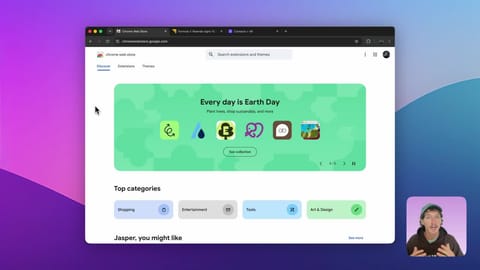
- Our new Chrome extension is here: The Prezly Toolbox 🧰 Found a journalist covering your beat? Prezly Toolbox helps you save them along the way. It'll automatically discover journalist details, and save them to your Prezly account in a couple clicks. Now available as a free add-on for all Prezly accounts. Note: This is in beta, results vary by page. Nothing is added to your contacts until you review and confirm.
- Want your press release to show up in ChatGPT? We built a free tool that tells you how likely your press release is to be cited by AI tools like ChatGPT, Claude, and Gemini (and how to improve those chances). Just paste in your release and you’ll get: - An AI visibility score - The statements AI is most likely to cite - Specific recommendations to improve it - An AI-ready structure optimized for discovery Now in beta and free for anyone to use. Try it here: https://lnkd.in/e6YwYeNA
- How is your brand showing up on ChatGPT? When AI cites a press release, 98.6% of the time it's one hosted on an owned newsroom – not a wire service, not syndicated distribution. So how do you make sure your releases land in that 98.6%? Next week's webinar looks at answering that question. We'll focus on practical steps you can take right now to improve your odds of getting cited, the best practices behind them, and how to bring these figures into your client reporting. RSVP and get the recording: https://lnkd.in/e3QwddEm 98.6% figure
- May was about the small stuff – the fixes that quietly give you time back. Here's what shipped: → Story templates, now available in every account – plus cleaner copy-paste from Word and Google Docs, with headings and lists intact → In-app previews – see how a story looks on desktop or mobile as you edit → Smarter contact views – presets and rolling 30/60/90-day filters to spot who's engaged and who's gone quiet → Better newsroom search – results now show the matching snippet and link straight to it → Branding import for new sites

Related profiles
Something wrong or missing? Send an update. Fixed within 24 hours.